Hi all. In case you wandered here to know all the details
about the Apple's new iPhone 4S, this is not the place. This is not a complete
product review, but a review on how the product fits into my needs. You can find lot
of quality iPhone 4S reviews on the web. My intention is to articulate how the
4S performs in conditions specific to Sri Lanka and the drawbacks Sri Lankan
users might face.
I got this phone from Singapore. iPhone 4S Factory Unlocked 16GB Black version running iOS 5.0.1. This was a huge upgrade for me as I was
using a 2007 iPhone model for the past 3.5 years.
Support from Sri Lankan service providers
If you intend to bring an iPhone to Sri Lanka, you have to get a locked iPhone and unlock it, or
get a "Factory Unlocked" phone to use with any local mobile service
provider. Locked iPhones are cheaper compared to factory unlocked ones. But
locked iPhones are very hard to unlock.
So if you bring a locked iPhone here, you might have to wait weeks, or even months
until a software unlock becomes available. So I recommend you buy a Factory
Unlocked iPhone if you are planning to bring an iPhone 3GS/4/4S into Sri Lanka.
Micro SIM
iPhone 4/4S only support Micro SIMs which are smaller than
ordinary SIMs. There's no technical difference between these two. Micro SIMs
just don't have extra plastic padding around the golden plate. You can either
cut it using a SIM cutter (or get help from a local phone shop to cut it) or
buy one from your service provider. Mobitel offers Micro SIMs for Rs 200/= for
existing users, Rs 400/= for new users.
If you cut your SIM yourself like me, remember to keep the
extra plastic frame that remains after cutting. You'll need that to re-assemble
your SIM in case you need to use it with some other phone.
 |
| My old SIM (on left) after cutting it, shown with an ordinary SIM (on right) |
User experience
Combined with Apple's thoughtful UI design, optimized OS and
the speedy processor, iPhone 4S provides a crystal clear UI navigation with no
hiccups at all. It's absolutely flawless and blazingly fast. You don't feel
like you are using a UI of a computing device because when you do stuff on the
screen, everything happens so fast and smooth without any response delays. It's flying in the breeze!
Siri
Even though it's still in beta, Siri is the most advertised
feature of the iPhone 4S. For users in US and other western countries, Siri
seems to work well. Personally, I don't have many of use-cases for Siri that are being advertised, but some
Sri Lankan buyers might be tempted to buy an IPhone 4S just because of Siri. If
you fall into the later category you might be disappointed.
Siri didn't recognize most of the things I said. I'm a
Sinhalese with the typical English accent of a Sri Lankan. Siri was completely
confused and answered incorrectly or told that she didn't understand me for
most of my questions. Some things worked, for example Siri understood my
question "What is the population of Sri Lanka?". Occasionally, she
also succeeded in setting up some alarms and meetings for me. Voice dictation
for typing text got most of the words wrong, making it impractical to use Siri to type SMS and Notes.
Calling a contact via Siri also failed in numerous ways.
Most of the time, she tried to call the incorrect person and every time she
tried to make a call (correctly or incorrectly), she ended the call apologizing
"Sorry, I cannot call person X".
Overall, Siri's voice recognition for me, was inconsistent
and practically unusable. Technically, Siri's response time was acceptable over
both my ADSL connection (WiFi) and Mobitel 3G. (For those who don't know, Siri
needs an internet connection to function. Siri sends your voice to a server and
it's the server which handles voice recognition.)
Voice Control
Fortunately, Siri can be turned OFF (Settings -> General
-> Siri), at which point the old Voice Control feature that debuted with
iPhone 3GS, will get activated. Voice control doesn't need internet but it's
very limited in its feature set. For me, the features provided by Voice Control
was mostly enough so I used that instead of Siri. If I could call a person and play
songs while driving, that's fine for me. But I'll miss the SMS read/reply feature
which only Siri is capable of.
I found out that Voice Control is far superior in
recognizing my commands than Siri. 90 - 95% of the time, Voice Control called
the correct person I told it to and played the songs I wanted. All without
internet. This is somewhat understandable since Voice Control has a narrowed
down search criteria (My Contacts and Song library) to match my Voice input with. So
for the moment I'll stick with Voice Control, although I cannot read/reply to
SMS while driving without Siri.
Both Siri and Voice Control can be brought up by a long
press of the middle button in the hands free kit so it's easily accessible even when you are driving. Here's a comparison between Siri and Voice Control from my experience
Sinhala/Tamil Typing and Fonts
iOS 5 includes Fonts required to display Sinhala and Tamil
content on the web. (Tamil was available way earlier than iOS 5 as I remember). But
there is no way to type in Sinhala or Tamil. You can copy Sinhala text from a
web page and paste it in text boxes (As shown in the image) but you cannot type
things on your own.
As a workaround, you can use
Google Transliterate to type
your Sinhala/Tamil content and copy it to the place you need. You can also use
Sanhinda free app (Sinhala only) from AppStore which I think would be better than the web
based Google Transliterate. I didn't use the
Sanhinda app yet but I found that
the UI in Google Transliterate is fighting with iPhone keyboard, and it is not
optimized for a mobile browser. So, being a native app, Sanhinda should do better.
The ideal solution would be a Sinhala keyboard which is
accessible from anywhere in the system. But this is one of those drawbacks iOS
has over Android because Apple doesn't allow third-party custom keyboards on
iOS.
Phone Number Formatting
As with every iPhone OS version from 1.0, iOS 5 suffers
from the inability to properly recognize Sri Lankan phone numbers. It can
recognize incoming calls and match it up with your contacts but it can’t do the
same with SMS. Since incoming SMS phone numbers are like +94714123456 (with +94
in front), it won’t match with the corresponding contact if you have stored the number as
0714123456 (with 0 in front). To recognise SMS numbers, you have to add an extra entry with +94
format for the same person. This problem occurs the other way round too. If you
have stored a number in +94 format, the phone won’t recognize incoming calls
from that number.
Unfortunately there’s no fix for this until a Jailbreak
comes up. Still there’s no jailbreak for iPhone 4S with iOS 5.
Camera
iPhone 4S camera is insanely great for photo taking and
video recording. Apple has done much more than upgrading the Camera sensor to 8
Megapixels. You can take photos in a blink, there's no delay in taking the
photo and saving it like you see on other high-end phones. Tap the button and
boom! the photo is saved.
I won't go into detail explaining the picture/video quality
and camera features (you can get that info elsewhere). I'll just say it's
simply awesome!
The only thing to keep in mind is that if you have a 16GB
iPhone 4S, you'd better watch your free space when you are recording video heavily. For a
one-minute video, iPhone 4S will consume more than 170MB of disk space. This is
because iPhone 4S records video in 1080p resolution, which has a very large video frame
size. With iPhone 4, it was 720p and the files size was around 80MB per
one-minute video. So with iPhone 4S, the file size is more than doubled. In the
built-in Camera app, there are no settings to reduce the video quality
(third-party camera apps might allow that). So if you are a looking for an
iPhone 4S mostly to do video recording, I recommend you get a 32GB or 64GB
model.
Another notable fact is that you also need a somewhat-powerful
computer to play videos recorded by iPhone 4S. A computer which is few years
old might not be able to play the recorded videos smoothly. In addition to
that, if you are a Windows user, you need to use Quick Time to play the
recorded videos or have the correct software codecs to play them in Windows Media
Player or any other player. Keep in mind that the video frame size of a 1080p video
(1920 X 1080) is actually bigger than the full resolution of most common
17-inch monitors we use. So your computer really needs decent graphics
processing power to play 1080p videos.
Connectivity
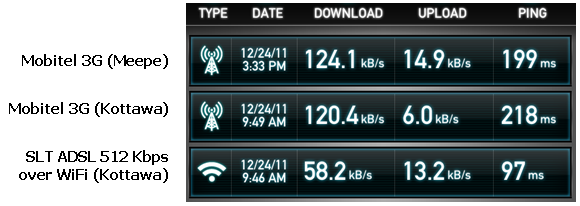
The phone’s signal reception (Mobitel) was pretty good. I
used it in Kottawa and Meepe. In Meepe we usually get 1 or 2 Mobitel signals,
but the phone still managed to provide fast 3G internet for me.
Here are the SpeedTest results for different connections I
used.
Battery Life
This is one of the most important concerns of any phone
user. So how does the iPhone 4S perform in this regard? In a nutshell, I can
say the iPhone 4S battery is pretty strong and it lives up to consumer's expectations.
I didn’t carry out a technically-timed benchmark of the
battery. But here are my general experience concerning the battery.
My friend in Singapore
who bought my iPhone 4S had it with him for almost a month in its original
packaging. He got it on 30th November. When I opened the box on 23rd
December morning, the phone had around 75% of battery left. Yes, the phone was completely OFF
while sitting in the package, but I think having 75% of battery, more than a
month after leaving the factory, is impressive.
Straight away after opening the
box, I proceeded to put to my SIM in and activated the phone via 3G, without
charging the phone. We played with it for a while and made a few phone calls (all from that
initial 75%) and the remaining battery was only slightly reduced.
On the same day, I charged the phone to 100% by mid day. And
after lot of playing and experimenting, it had 77% battery left when I was
going to sleep that night. In the next morning, it had 68% battery left (9% drop overnight). Starting with that 68%, after the
first full day of very heavy use with occasional charging (when syncing via iTunes), the battery died around 7PM. The last 1% of the
battery, I used for 30 minutes of constant gaming and playing videos (without headphones) with the intention of draining the battery. I also observed that the wall charger charges the phone from 0 – 100% in around 2 hours.
Here are the list of things I did throughout the day.
Remember, this is my first new iPhone after 3.5 years, so I had a lot to do with
it on its first day.
- Lot of camera activity
(Experimenting with auto focus, Macro photography, lots of photos and videos)
- Lot of experiments with
Siri and Voice Control
- Lot of internet activity
(WiFi and 3G) throughout the day (Reading articles, YouTube, Facebook, Twitter)
- Playing Games
- Reading books (Lord of the Rings. I recommend you read it
starting with ‘The Hobbit’ if you haven’t already.)
- Playing songs and videos (without headphones)
- Occasionally making calls and SMS
- Occasionally plugging into iTunes for syncing apps and
videos (This charges the phone battery)
Maybe the reason I had a very decent battery life out of
iPhone 4S even while in heavy use, might be because I was a conservative
resource user. Here are the list of phone features which were turned on/off.
- 3G was turned OFF when WiFi was available.
- 3G/WiFi was turned OFF when I’m not using the internet (eg.
when playing games, Camera activity)
- Location Services (GPS) was ON the whole time.
- iCloud syncing was ON.
- Push Notifications completely OFF.
I recommend you turn off 3G (Settings -> General ->
Network -> Cellular Data) when not using internet in order to save your phone bill. I don’t
care about push notifications so I kept it off and that would have made an
impact on the battery life if I hadn't done so.
So overall, it seems the iPhone 4S can get an ordinary
smartphone user easily through the day without being recharged. It might be the case that the battery is still new and the battery life might change over time.
Other users might also experience different battery life depending on the
usage. But I’m definitely impressed with the battery life I got.
Damage Resistance
iPhone 4 and 4S are like delicate flowers because of their
glass front and back. They make the phone a beauty but they can easily be
cracked if you drop the phone on a hard floor. So I recommend you use iPhone
4/4S with a proper casing. The phone’s structure is very strong (you can feel
it when you hold it). Nothing will happen to the phone internals if you drop it
(I didn’t test it though), but the glass panels will crack making the phone
unusable until you replace them. My friend from Singapore said Apple doesn’t give
warranty for iPhones with cracked glasses.
Conclusion
Overall, I’m very impressed with the iPhone 4S, specially
since I have been using an old 2007 iPhone for a long time. But for iPhone 4
owners it’s not a worthy upgrade. As with all Apple products, the delight of
the iPhone is not in the specification sheets, but in actually using it in your
day-to-day life. The issues that exist, are there because of the region we live
in, which is still not fully supported by Apple. (Built-in support for Sinhala
fonts is a step in the right direction)
So I hope this article aided prospective iPhone buyers in Sri Lanka.
Please leave a comment if you have a personal observation or a tip that might
help other users.
.