Wednesday, January 23, 2008

Vista Sinhala Typing Fix

Vista has built-in Sinhala support. But it has few problems when typing certain letters. This fix addresses those problems. Easy to install.

Link Updated:

Update:
This works on Windows 7 as well.
..

Sunday, January 20, 2008

Vista Hibernate problem fix

I think this is a bug in vista. Sometimes there is no way to hibernate the computer. Hibernate feature is gone. This can happen when you run disk cleanup. You can turn on Hibernate again by running this command in command prompt (Run as administrator).

powercfg /h on

Hibernate should appear in the shut down menu now.

if you don't want it, run:

powercfg /h off

Change Vista start menu power button action

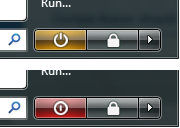
By default vista start menu power button is set to "Sleep" mode (Indicated by Orange). That means when you click it, the computer does not shut down. It goes into sleep. This is pathetic and is cursed by most users. You can set the button to power off mode so when you click it, the computer actually shuts down.


1. Go to Control Panel -> Power Options.

2. You will see 3 power plans. Balanced, Power Saver and High Pwerformance. One of them should be selected.

3. Click 'Change plan settings' under the selected choice.

4. Click 'Change advanced power settings'.

5. Expand the category 'Power buttons and lid' and expand 'Start menu power button' section.

6. Change action to 'Shut down'. If you are using a laptop, select 'Shut down' for both 'On battery' and 'Plugged in' states.

7. Click OK.

That's it. Now the start menu power button should appear in Red. When you click it, the computer will shut down.

Saturday, January 19, 2008

Ubuntu Gutsy: Getting compiz-fusion working under ati fglrx driver

First of all I have to say compiz-fusion is really cool! And with Gutsy we don't have to play with custom scripts for xserver anymore. Getting it working is so easy.

Follow these steps:

1. Refresh your package list using Synaptic.

2. If you haven't done so already, select and install package "xorg-driver-fglrx" and Restart the computer.

4. Select and install package "xserver-xgl".

5. Ubuntu will notify that the xserver setup has changed. Restart the xserver using Ctrl+Alt+Backspace.

Compiz-fusion should be working now. To check, go to System -> Preferences -> Appearence -> Desktop Effects and select Normal or Extra effects.


Installing compiz settings manager

The standard appearance dialog box doesn't allow custom configuration to compiz visual effects. You have to use Compiz settings manager for advanced customizations and for some extra cool effects.

1. Using Synaptic, select and install package "compizconfig-settings-manager".

2. To access settings, Click the "Advanced" button in Desktop effects tab.

Enjoy!

Monday, January 14, 2008

C# 3.0 Extension Methods

The new extension feature in C# 3 allows us to add New definitions to existing classes. In other words, we can introduce new methods to any class without inheriting our own type from it.

For an example, take the String class. This calss already has some methods for string manipulation like Split(), Trim(), .... Suppose we would like to add a new feature to the String class, like GetWordCount() so we could use it like this:

string str = "The new feature";
int words = str.GetWordCount();

Note that we have not created a new type. We are using the same old String class but with a new member method. We can achieve this by extension method.
static int GetWordCount(this string s)
{
//
//Word count logic goes here
//
return count;
}
This method can be inside any class. The only thing matters is in what namespace the method is. If the GetWordCount method is in a namespace called MyExtensions, you can load the extension by adding the using directive like:

using MyExtensions;


So the String class will appear to have an extra method called GetWordCount whenever you use this namespace.

Refer to MSDN for better in-depth article.
Visual Studio 2008

Visual Studio 2008 is now available. These are the download link for free editions:

Visual Studio Express 2008 (900 MB ISO Image All-in-one DVD)
http://www.microsoft.com/express/download/
(go to the link at the bottom of the page)

MSDN 2008 (2GB), MSDN Express 2008 (300MB)
http://www.microsoft.com/express/download/msdn/Default.aspx

.Net Framework 3.5 redistributable package (197MB)
http://download.microsoft.com/download/6/0/f/60fc5854-3cb8-4892-b6db-bd4f42510f28/dotnetfx35.exe

Sunday, October 28, 2007

Ubuntu Gutsy

Nah! Ubuntu 7.10 Gutsy didn't went on with me as I thought. All the improvements fades away with the amount of bugs it has. The thing is that it comes up with different bugs on different machines. Still didn't downloaded the ati fglrx driver. So no experience on Compiz Fusion just yet.
Google