Monday, May 5, 2008

iPhone Tweaks

To do these, iPhone has to be unlocked and Installer app should be installed. All the instructions are for Firmware version 1.1.4.

  • Refresh the sources in installer app.
  • Go to Sources section and then install Community Sources.
  • Refresh the sources again.

To fix the caller ID problem:
Go to iClarified section and then install AppSupport Patch (1.1.4).
Reboot the iPhone.

To fix the file system access issue with ZiPhone and iBrikr
Add the source iphone.unlock.no to installer app.
Refresh the sources.
Go to Unlocking Tools section and then install ZiPhone iBrikr Fix.
Reboot the iPhone.

To disable the keyboard's auto-correction feature
Go to Tweaks section and then install Kb.
Reboot the iPhone.
An enable/disable setting will be added to the General -> Keyboard section in iPhone settings.

To fix the root password incorrect (su) issue in MobileTerminal
Source iphone.lenlolabs.com should be added to installer app sources.
Go to Tweaks section and install the BSD Subsystem 2.x SU... patch.
Reboot the iPhone.

Usefull Software Sources
iSMS: http://iphone.nonsoft.com/repo/
(A new section called Shawn Chain's Apps will be added to the installer)

MobileTerminal: iphone.lenlolabs.com
will be in System section)

iPhysics: http://iphone.r4m0n.net/repos

Usefull Software
Listed as found in the Installer app.

Dictionaries
Merriam Webster

Games
Chess
ContraSence
GemLogic
iCave
iSolitare
Labyrinth
Pool
SuperPong
Tris
Yeti3D

iClarified
Pysl
Safari Download Plugin

Multimedia
Camera Pro
Voice Notes

Productivity
Mobile Finder
Sketches
weDict

System
Categories
SummerBoard
Terminal
XLaunch

Toys
RealArtist

Utilities
Accelerometer Log
Capture
Customize
SysInfo
weTool

Sunday, April 20, 2008

From 4,000 to 40,000

Goodbye my 4,000 rupee Sagem MyX1! Oh I liked that phone (and I still do). But I have no choice. I have to make room for my all new 40,000 rupee iPhone ($426 to be specific). It's a Wow! and the Wow started on 14th April 2008. Thank you Amma for the momentous financial support! and thank you Dilshan ayya and Sameera ayya for the USA contact. This is the best present I've ever had. The best phone and hopefully the best computer too!

Phone specs :

CPU Frequency: 412 MHz
(The processor is a 600MHz underclocked ARM processor)

Bus Frequency: 103 Mhz
RAM: 116 MB
Capacity: 7.3 GB
OS Version: 1.1.4

Unlocking iPhone

This must be the easiest thing in the world. Download ZiPhone for windows, connect the iPhone, and click the big button. 3 minutes of boot loader patching, installing, rebooting... all done automatically. You have a fully unlocked, hackable iPhone. This is where you get the amazing package manager (just like synaptic) in which you have access to numerous software repositories. At the lowest level, now you have BSD subsystem for Unix running underneath the MacOS.

Built-in Vs Third Party apps

Apple has made a wonderful device that's truly unique and amazing. And they have built truly unique and amazaing software for that device (including the OS). But some of them really SUCKS! That's where hackers step in. They have released various patches and countless software utilities to make the iPhone user's life easier.

At first few days I was pissed off by iPhone's numerous software glitches. Caller ID detection problem and SMS application limitations. Both was fixed using a patch and a third party SMS application (iSMS). Now I've tuned my iPhone to gain the max out of it and to suit my needs. These are some third-party apps I've installed on the iPhone.

iSMS : Really nice SMS application


AcceleroLog : Draws graphs using iPhone's accelerometer (The accelerometer is used to detect the phone's orientation in 3D space).


HP-16C scientific calculator : I make no use of this.


Terminal : You know.


Finder : This is the windows explorer equivalent of MacOS. You can browse through the filesystem.


SysInfo : System and Process info viewer.


Cydia : apt based package manager. It's really amazing. You can add sources to /etc/apt/sources.list.


Capture : Screenshot utility. The screenshots in this page were taken using this.

Another 2 screenshots of built-in Maps application and Safari, just to make it interesting:

Maps : Google maps based application.


Safari : Internet browser.


Bottom line : iPhone is Nothing without Third-party apps.

Music and Video

Superb! Audio quality and video playback quality is just superb! With apple ear phones and the gorgeous high resolution screen the iPhone gives you an unprecedented multimedia experience. I'm not going to say more than this because you just have to experience it.

Battery Life

Enough of technical blah blah! Now for matters that concerns any mobile phone user. Today most phones have a battery life of 4 to 6 days of normal usage. I've been using the iPhone for a week now. For iPhone, I'd give the iPhone a maximum 2 days of battery life. And surprisingly, I'm really satisfied with that. Being a highly interactive and feature rich phone, iPhone is subjected to a heavy usage throughout the day. Playing music, videos, internet surfing, and the highly responsive touch screen forces the user to play with the phone along the day. So the battery drain is faster than any other phone.
iPhone comes with a dock connecter which has a USB cable. iPhone can be placed on the dock and the USB cable can be connected to a computer for battery charging or data transferring purposes. Apple also provides a handy plug base which is USB-to-230V convertor. So you can use it instead of a computer to charge the iPhone.

Bottom line : Virtusa doesn't allow to plug USB devices to computers!

Extendibility

The iPhones extendibility is limited only by it's hardware mentioned below). With the power of Unix at the back and MacOS at the front, and outstanding hardware components such as the accelerometer and Multi-touch screen, you have a computer platform with unique capabilities to develop your applications. So if you're an iPhone user, you'll never see the end of customizing your phone.

Bottom line : Only XGL is missing. (Maybe it'll come too!)

Limitations

Ok, what's the catch ha? Here are the limitations of the iPhone which may effect many mobile phone users.
  • No 3G (only 2G+EDGE).
  • Camera has no zooming capability.
  • No flashlight.
  • No video recording software (yet).
  • Has no user serviceable components. The entire iPhone is sealed (including the battery).
Actually you won't mind these when you get to use it and see it's power. The most annoying limitation is:

  • Too attractive. You can't work on it in a public place without drawing other people's attention. It's really annoying.

Sri Lanka

Now pray I wouldn't loose this phone in the bus. Usage-wise it has a scratch-free screen and a PC-Magazine video shows that nothing happens if you toss it on a concrete floor. But who knows! So I'm going to get a casing for this. Probably with-in 2000 to 3000 rupees ;-)

Bottom line : iPhone casing costs nearly as much as my old phone!

Planing to buy?

It's really worth 400 dollars. But if you are going to buy from Sri Lanka, it'll take more than Rs. 65,000 which I think too much. So try to buy it directly from US. Believe me, it'll be a good deal.

Grand bottom line : I recommend an iPhone to anyone.
..

Sunday, March 23, 2008

iPhone: from a developer's point of view

First of all, I must say that, although the name suggests, the iPhone is not a phone. In short terms it’s an apple computer that fits on your palm which has GSM calling/SMS capabilities. (Maybe that’s why it lacks some of the features that Nokia high end phones provide!). It runs a light-weight version of Mac OS X and it has the same architecture of a Von Neumann computer up to a certain extent. So as a developer, one should keep in mind that developing native applications for the iPhone is much like developing GUI applications for Mac OS (or Microsoft Windows). When compared to other smart phones on the market, iPhone is inherently much much more powerful and flexible than them. Not only because it’s a computer, but because it’s a computer with a big multi-touch screen, a 3 axis accelerometer sensor and a Geo-Locator system which can report the Geographical location of the iPhone using signals from cell towers or Wi-Fi hotspots.

Although the iPhone is like a computer, it has significant differences compared to a desktop machine. It’s usage is entirely different. So developer’s should keep that in mind when developing applications.
  • The screen is compact compared to a desktop monitor, although it’s bigger compared to other phones. So only most relevant features for a mobile device must be included in the application.

  • Users use their fingers instead of the mouse and the keyboard to give inputs to the iPhone. So GUI elements must be big enough to be touched by the user.

  • iPhone users use the device when they are on the move. So they need to access important information as quickly as possible without going through so many screens or inputs.

Application Development

I’m a windows programmer. I had never used an apple machine nor did I knew about MacOS system architecture. But after going through iPhone SDK articles I found out that MacOS and iPhone GUI architecture closely resembles Win32 GUI programming. So I found it very easy to follow up on iPhone SDK with the knowledge of Windows GUI event driven architecture. The GUI framework in iPhone is known as UIKit which is a component of Cocoa Touch as opposed to Cocoa in MacOS.

iPhone SDK uses a language called Objective-C to write programs. At first the syntax was a little bulky for me. But you can catch up on the syntax in 10 minutes. It’s the same object oriented architecture in a different syntax.

iPhone SDK has a nice GUI class hierarchy which reminds me of Microsoft .Net Framework Windows Forms class hierarchy. These classes use delegation to receive and handle events in a way similar to Win32 callbacks and .Net framework delegates. For example, the developer can register an event handler for the “touch” event of a button.


(Portion of UIKit classes. Image extracted from an ADC article)


iPhone SDK encourages developers to use MVC (Model, View, Controller) architecture in their application. This ensures that the GUI is separated from the application logic and the data model.


(MVC architecture)

Multi-Touch Events

Just like MacOS and Windows, Cocoa touch framework uses an event-driven architecture to raise and handle events. Unlike traditional keyboard and mouse events on a desktop, the iPhone has “touch” events. When user’s fingers touches the iPhone screen, the touch sensor sends information of each finger touch to the OS. This is how multi-touch technology works. When multiple fingers touch the screen, the event handlers for any GUI elements receive information about all the touches through multiple event objects.

The iPhone SDK API directly supports simple tough gestures such as swipes, double taps and pinches. To handle more complex gestures you can examine the event objects to generate your own custom events.


3 Axes Accelerometer

The iPhone has an accelerometer which can report acceleration data of the device in X,Y and Z axes (see image). Because of the gravity of the earth, the 3 accelerometers record different accelerations in 3 axes.


(Image extracted from an ADC article)


Why do a phone need an accelerometer? Well, using the iPhone, you can do amazing things with the help of the accelerometer. Using it, you can get the orientation of the device in 3D space at any given time. You can create orientation aware applications that responds to the physical orientation of the device. The application can change dynamically depending on how the user holds it. A basic use of this is demonstrated by the built-in Photo application where photos automatically switches to the landscape mode when user holds the iPhone horizontally.

More advanced and exciting use of it is gaming. (iPhone uses OpenGL ES to render 3D graphics). You can combine the accelerometer data into your game to use the whole phone as a joystick. When the user tilts the phone just like a joystick, the objects on the game can respond accordingly to create an exciting user experience. This video of iPhone SDK event shows OpenGL ES and accelerometer in action. It shows an application in which the user can “shake” the phone to perform undo operations and a 3D game where the gamer can fly the fighter jet by tilting the iPhone like a joystick.

Applications can register an event handler to receive acceleration events. A reporting frequency can be specified. The default is 100 times per second. This is good for games. But you should use a frequency to match your application’s needs in order to save the battery life.


Resource Management


Since iPhone is a mobile device which runs on battery, every effort must be made to make your applications efficient. Developer should take care of releasing resources which are not needed. Mac OS X natively has a garbage collector to free up resources (wow, isn’t it! Windows doesn’t have it!). But iPhone doesn’t have the luxury of a garbage collector since it’s restricted to a low power consumption environment. The SDK uses reference counting mechanism to keep track of the resources which are in use.


One Application At a Time


iPhone can run only one application at a time. Of course, the OS kernel and few low-level demon threads keep on running all the time, but only one user application can be run at a time. This ensures low processor usage and the applications get to have the full resources of the device at their expense. So if a user receives a phone call or presses the Home button while they are working on an application, that application really exits. This is a one major fact that iPhone application developers should take into account.

Although there are some benefits of this exclusive application execution, developers have to make their applications to adapt to this environment. Suppose a user receives a phone call while they are editing a photo in a photo editing application. Application exits and phone call application launches. The application should be able to restore it’s last working status when the user goes back to that application after the phone call. So the developer must save the status of the application when it quits and restore it back when it is launched again. All application receive notifications when the system is going to quit the application. As I understand it, it maybe something similar to the “Kill” signal in Linux.

This is an important design aspect in the iPhone. Almost every built-in applications have this restore feature giving the illusion that the application keeps running in the background when it is interrupted. What they actually does is, save the state when they are exited, and restore themselves back when they are launched the next time.

Development Tools

iPhone SDK comes with a rich set of tools which can aid developers in developing iPhone applications. XCode is the IDE for iPhone applications. XCode only runs on Mac OS X or later. It has instruments which can remotely monitor and debug your applications. Deploying applications is easy. Only a single button click; your application is compiled and loaded into the iPhone. You can build your application into a real iPhone connected to the computer or you can use the iPhone simulator that comes with the SDK. The aforementioned video shows the remote application performance monitor, monitoring the performance of the 3D game. I must say, it’s as good as Microsoft Visual Studio 2008 (if not better). As a .Net framework developer, I find it easy to adapt to iPhone development.

Conclusion

This article only describes most exiting features of the iPhone SDK. There are many more features such as OpenGL, Media framework, Animations, Microsoft Exchange support etc… If you are interested I suggest you register on the Apple Developer Connection (free). You gain access to lots of documents, videos (through iTunes) and sample applications.

Finally, I must say, iPhone truly is an amazing device which opens the door for a new generation of mobile devices. Apple has developed a flexible framework and tools that developers would love to develop on. They launched the iPhone SDK on March 6 (watch videos). They will release iPhone 2.0 software update on June. As for me, I’m just waiting until my iPhone arrives on April. Let’s hope for the best!

..

Saturday, March 1, 2008

Paint.Net : A free image editing software

Paint.Net is a free, Photoshop like software created on .Net framework. It includes all the features that most of us need for everyday image editing tasks. It also includes most of the image filters which comes with Photoshop.

If you do simple image editing tasks and if Photoshop is too big, Paint.Net is just the right solution for you. Very user friendly and light weight. I use it myself instead of Photoshop.

Download link: http://www.dotpdn.com/files/Paint.NET.3.22.zip (1.6MB)
(.Net framework 2.0 has to be installed)

Home page:http://www.getpaint.net/

Wednesday, February 20, 2008

ZiPhoneGUI : GUI app to unlock iPhone (upto firmware version 1.1.3)

ZiPhoneGUI is a nice easy to use GUI application for windows which can fully unlock your iPhone. It performs all Jailbreak, Activate and Unlock operations whithin a single button click. Also includes an advanced section which you can perform advanced operations on the iPhone. (But most users wont need it)

Open source project:
http://code.google.com/p/ziphonegui/

Download:
http://ziphonegui.googlecode.com/files/ZiPhoneGUI.exe

A screenshot of ZiPhoneGUI:


ZiPhone

ZiPhoneGUI is a wrapper for Zibris ZiPhone project which is a command line utility for all iPhone unlocking tasks. For both Windows and Mac.

visit:
http://www.ziphone.org/

Download ziPhone (no GUI):
http://downloadziphone.org/ZiPhone2.4b.zip

I personally didn't test it. But it defenitely seems good.

Monday, February 4, 2008

Use Skype through Pidgin

Pidgin is an open source IM client that supports various IM protocols such as Google Talk, Yahoo and MSN. By default it doesn't have the skype support. But there is a plugin which can add the support so u can chat and call skype users from pidgin.

The plugin uses the Skype public API. So to use this plugin, Skype have to be installed. Check this link: http://myjobspace.co.nz/images/pidgin/

For windows
  1. Download this file: http://myjobspace.co.nz/images/pidgin/libskype.dll
  2. Copy it to the Plugins folder where you installed pidgin.
For Linux
  1. Download this file: http://myjobspace.co.nz/images/pidgin/libskype.so
  2. Copy it to /usr/lib/purple-2/ or ~/.purple/plugins.
Then
  1. Restart Pidgin.
  2. Now you can create a new Skype IM account in pidgin. (Skype has to be running to use this plugin)
  3. Skype will display a confirmation message.

Then u can use pidgin to chat with and call to skype contacts.

Friday, January 25, 2008

Virtual Machines

This is an article I wrote for a magazine some time ago. I thought of publishing it here. Good for new programmers and computer science students.

In this article I’m going to discuss about what are virtual machines, their uses and the help we can get from them for our software development work. Even if you haven’t heard about virtual machines before, you may find them quite interesting when you get to know about them.

The term “Virtual” means something that does not physically exist. It’s something that allows us to interact with it in an imaginary sense. Consider playing a game. The game world does not really exist but it’s just a simulation that allows us to play in it. In the same manner virtual machines are machines (computers) that exist only as a simulation.

How to create a virtual machine

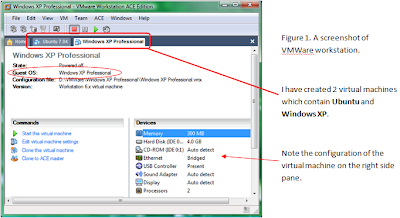
When you install the necessary software, you can create your own virtual machine on your real computer (on Windows or Linux). This virtual machine can have a RAM, hard disks, a BIOS and other configurations as you specify. Here are some virtual machine software that are currently available:

Commercial. Mainly used on Windows

VMWare Workstation
Microsoft Virtual PC

Free and open source. Mainly used on Linux

QEmu
Virtual Box


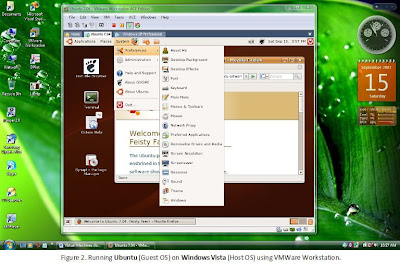
Once you create the virtual machine you can install an operating system to it just as you would do in your real machine. Insert the operating system CD and boot the virtual machine. (The OS on the virtual machine is called the Guest OS. The OS on your real machine is called the Host OS.). You can see the screen of the virtual machine inside a window that appears in your virtual machine software. (See Figure 2)


The Uses

You may wonder what is the use of having a virtual machine on your computer. Well, the use is obvious. You could work on several operating systems at the same time without having to reboot your computer or moving to another real computer at a different physical location.

Suppose you are writing a software or a website on Windows and you want to test it on Linux. With a virtual machine, you can easily switch to the Linux machine (Just like in Figure 2) and test the software on that machine. Of course, modern virtual machine software support drag-n-drop facility so you can easily drag your files into the guest OS.

Networking

You can connect your virtual machine to a real network at your home or workplace. So the other machines on your network will see the virtual machine as a real machine. If you don’t have a network, you can create a small network between your real machine and the virtual machine. So you can test your software and do other network related stuff, just as you would on a real network (but no wires involved!).

You have nothing to loose…

Here is the best part about virtual machines. You don’t have to spend money to create them. So you can have any amount of memory or hard disk space you want on the virtual machine in a matter of few mouse clicks. (Of course, it is limited by the hardware configuration of your real machine). So you can experiment on the virtual machine without having to fear about breaking something or corrupting your operating system. If you break it, you can simply delete that machine and create a new one. It’s just simple as that.

So, begin digging. Test some virtual machine software and get a feel of it.
Google