Tuesday, September 15, 2009

Gaming Industry and "XP Effect"!

Of course this is not about running games on windows XP. :-) I thought of writing this because 1) I haven't written a blog article from some time and 2) I see some dilemma that has been plaguing the technological progression of these two ecosystems. Hence the reason for the title of this article is the similarity that exists in the direction these two are headed.

If you are not a gaming fan you might consider skipping this article. (it's boring anyway!)

First let me extract what is known by many people. Even after two progressive Windows releases, Windows XP still dominates the market as the primary operating system of users arround the world. With advancements of computer hardware and software, you would expect people to move forward. In fact, that's what actually happened in the past. If we consider only the Windows community, users have steadilly migrated onto new operating system versions from Windows 3.0 era to XP era. With hardware advancements over time, the operating system designers were able to deliver new features and concepts and users willingly grasped them.

But since then, the Windows ecosystem seems to be stuck on Windows XP for a long time. (Argubaly, there maybe several reasons for it including Microsoft screwing up over Vista but that's not what this article tries to discuss) The point is, despite rapid growth of hardware and software capabilities, most end-users have decided to stay with what they are already familiar with. It seems that constant "change" that have existed with end-users, is "stabalized" for the past few years.

In my point of view, the gaming industry too have faced this kind of stabalization point in terms of exploiting hardware capabilities. In the case of Windows XP, it was the end-users who seems to have reached a stabalizatin point. But in the gaming industry, it's the game developers that have reached a certain stabalization. In the past, we saw games being released with higher and higher hardware requirements. When you buy a graphics card, it'll be obsolete within a month or two. But now, all the new gaming titles seems to aim a certain level of hardware requirements that would no way require high end graphics cards.

The Reasons

There's a lot. Talking about Windows, users were pretty satisfied with features offered by Windows XP. Most couldn't justify moving onto Vista with the overhead it had on the system and the user himself. The jump caused a considerable change of user interaction. Users simply chose to stick with what they already had, since it was familliar and enough for their requirements.

The same goes for the gaming industry. Only that it maybe little more complex. There is a level of harware specification that can be regarded as familliar and enough for most gamers and that's the level the game developers going to build their games on. This is mostly decided by the current versions of gaming consoles. Unlike PCs, gaming consoles (XBOX, Playstation, etc...) are the major market for games. We can see new PC graphics cards released every month but gaming consoles may take years to re-iterate. So a game which requires the highest hardware capabilities end up being available to a limited set of the consumers. Since developers like to expand their market they compromise on the game graphics to make it available to a larger gaming community.

The Effects

On Windows, what always happens will happen in this case as well. Developers will write software for XP because a large user base is available and users will continue to use XP because there are lot of software available. The downside is the old operating systems and software will not get to use new hardware features supported only by new software.

Talking about games, of course, graphics does not make a game. There's a lot more to it. Developers can make superb gaming titles by inventing controversial story lines, music and gameplay experience. But for "graphics-freaks" like me, gaming graphics will always matter! In fact, I'm using a somewhat old graphics card (see here). But it has more horsepower than all the recent games I've played need (except Crysis). I really wish those games exploited that extra power and improved more on graphics. Although we think the games will be more and more realistic, it will take a longer time to progress as the industry addresses the requirements of the global market.

If you read it this far, I know there are lot of points you may not agree. It's open for discussion...
.

Friday, July 24, 2009

Windows 7

Though I was lazy to download Win7 RC due to exams and stuff, I got a copy thanks to the Microsoft .Net Forum Sri Lanka. I installed it on a separate partition since I didnt like to replace my 64bit Vista with this 32bit version. Here's a personalized review of Windows 7 mentioning the improvements in my interested areas.

(There are tons of in-depth Win7 reviews out there. This is just a personal preference of feature additions that I stumbled upon in my usage)

Overall, Windows 7 is snappier and cleaner to the highest level. Here are some additional things I noted:

Displays the really usable memory in system properties

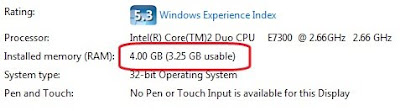
See this post. 32bit OSes cannot use 4GB RAM. They are limited to 3.25GB. On my system, XP 32bit showed 3.25GB as full memory available. But in Win7 32bit it shows both the real memory and usable memory in system properties. This would avoid user confusion in situations like I faced as in the aforementioned post.


Performance Index Differences

Performance Index scale has been changed in Windows 7. Compare the rating I have in Vista and the new rating. In Win7, CPU and RAM performance index have been moved higher. I got a lower index for hard dist performance since I installed Win7 on an IDE hard disk. Otherwise my Base score in Win7 would have been 5.7, compared to 5.5 in Vista.


Rating in Vista SP1 (in SATA HDD)


Rating in Windows 7 (in IDE HDD)


Detects iPhone even without iTunes driver

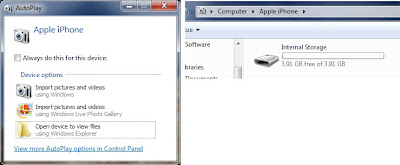
Windows 7 detected my iPhone straight away and allowed me to use it as a camera. In XP and Vista, the iPhone won't even charge from the USB without the driver installed. This would make my life a lot easier if everybody had Windows 7. :-) It's worth to mention that Ubuntu had this driver built-in from some time ago.


Video format support

The video formats we love; xvid, divx, h264 and more, are natively supported in Windows 7. So you can watch your films even without installing a codec pack or another player. But for subtitles, you will need a player like KMPlayer or VLC.

Sinhala Typing isn't fixed yet!

That wiered Sinhala typing problem we had in Vista, still exist in Windows 7 as well. I had to install Vista Sinhala Quick Fix to fix that.

Saturday, July 4, 2009

My 3 Column Blogger Template

I felt 2 columns was not enough for my blog and decided to change it to 3 columns. I found this article showing how to take an existing blogger template and make it 3 column: http://www.bloggerbuster.com/2007/07/create-three-column-blogger-template.html
This article modifies the blogger Minima template, but I did this on blogger's Son of Moto template.
I was previously using Son of Moto template since I liked its fonts, link colors and all but I decided to change it's Greenish color theme to my own one. This was pretty easy, considering I had no experience in editing CSS before!


If somebody liked my template and wanted to modify, you can download it from the link below. Remember, this is just a modified version of Blogger Son of Moto template.

Download Link: http://www.mediafire.com/?ytdywrnq4zn

All images are tiled .gif ones. and they add up to just 1KB. I cannot guarantee the availability of images in its current server. So I suggest you host the images on your own server if you really need to use those.
.

Sunday, June 21, 2009

How to unlock iPhone with OS 3.0

WARNING: The procedure in this post may not always give the same correct results. So use it at your own risk.

Apple released iPhone OS 3.0. So Dev-Team has released a jailbreak tool for OS 3.0. This lists down the steps for upgrading your iPhone to OS 3.0 and then jailbreaking it. FYI, Jailbreaking and Unlocking are two separate things. You have to Jailbreak before unlocking. Jailbreaking is cracking the OS. Unlocking is making any SIM work with your iPhone.

The procedure is slightly different for iPhone 2G and iPhone3G. So do whatever applies to you. The process is fairly easy and doesn't use any command line tools..

I personally did this procedure only on my iPhone 2G. I have no way of testing this for iPhone 3G.

Upgrading the iPhone
  1. Open iTunes. (version 8.2 or later must be installed. Get it here)
  2. Connect your iPhone to the computer. iTunes will show the iPhone sync screen.
  3. Click the Update button in iTunes.
  4. iTunes will begin downloading the firmware file (about 240MB).
  5. The download progress will appear in the "Downloads" section of iTunes left panel.
  6. You can disconnect your iPhone while the file is being downloaded. Connect it after the download and click Update button again.
  7. iTunes will install the downloaded firmware file to your device. This may take like 20 minutes or so.
Upgrading is finished. If you are using an unofficial SIM the phone will be locked. Now for the jailbreak and unlock.

Preserve the downloaded firmware file
  1. Now you have to locate the firmware file iTunes just downloaded and store it in an easy to access folder.
  2. In My Computer, go to this address: %AppData%\Apple Computer\iTunes\iPhone Software Updates
  3. This folder is where iTunes stores downloaded iPhone firmware files. You have to copy the file corresponding to your iPhone to any folder you like for future use.
Here are the file names:
  • for iPhone3G : iPhone1,2_3.0_7A341_Restore.ipsw
  • for iPhone 2G : iPhone1,1_3.0_7A341_Restore.ipsw
Copy the file to any folder you like.

Jailbreaking Procedure
  1. Download the latest version of redsn0w torrent from here: http://thepiratebay.org/user/iphonedev/
  2. Extract the downloaded archive. There will be a program called redsn0w.exe in it.
  3. Run the redsn0w.exe. This is the jailbreaking tool.
  4. Carefully read instructions on the screen and do what it says.
  5. In the first screen, click browse and give the firmware file you copied before.
  6. In the next screen put a tick for Cydia and click next.
  7. Follow instructions on redsn0w and if u follow it the phone will be jailbroken within like 15 minutes or so.
Unlocking Procedure

If you upgraded an iPhone 2G it should be already unlocked. iPhone 2G does not loose its unlock when upgrading. On the other hand, iPhone 3G looses its unlock when upgraded. So you have to install ultrasn0w to unlock iPhone3G.

This is for iPhone3G only.

Unlocking instructions are also available here.
  1. Connect the iPhone3G to the internet (WiFi Only. Cannot use 3G since SIM is locked).
  2. Open Cydia in iPhone.
  3. In Cydia, go to Manage -> Sources
  4. Tap Edit, then tap Add.
  5. Type this in the text box: repo666.ultrasn0w.com (There's a Zero in the word ultrasn0w)
  6. Tap Add Source. Wait until it refreshes. If you typed it wrong, it will give an error.
  7. Go to Search and search for "ultrasn0w" and install it.
  8. Reboot your iPhone3G.

Incoming phone number detection issue


iPhone does not support Sri Lankan phone number formats (as many other unsupported countries). So if your address book contact has 071123456 and if you receive an SMS from +9471123456 then the SMS will not detect the contact name for that number. You can fix that after jailbreaking by installing a patch from Cydia. You don't have to do this if you don't have the issue.
  1. Connect your iPhone to internet (through WiFi or 3G).
  2. Open Cydia. (Cydia is automatically installed when jailbreaking)
  3. Wait until it refreshes its database.
  4. Go to search tab from the bottom panel.
  5. Search for "Caller ID Fix"
  6. Some results will appear. As at the time of writing the latest version was "Caller ID Fix for 2.2". I installed this on iPhone OS 3.0 and it worked for me.
  7. If it shows a fix for 3.0 then install that version. Otherwise fix for 2.2 will be OK.
  8. Tap on the item and install it. It will do some rebooting stuff after installing and your contacts should be identified correctly now.
Through Cydia you can install lot more interesting stuff.

Cycoder - Video recording application
Winterboard - Apply themes for iPhone
Categories - Group icons into folders
SBSettings - easy access panel to popular settings

Put any questions you may have on comments. Good luck!

Update
redsn0w torrent download link changed to http://thepiratebay.org/user/iphonedev/
.
.

Monday, June 8, 2009

NFS Undercover on iPhone

I'm ill. So I found myself some time to install NFS Undercover on iPhone and have been playing it since then. I have played several racing games available on the AppStore. This is by far the most exciting and quality racing game I have played on iPhone. EA really knows how to keep its standards.

The game has nearly all the features as the PC version:
  • Same stupid story
  • Police and traffic
  • Nitros and Speedbreaker
  • Slow-motion and tilting cameras (gives a really thrilling experience)
  • Car customizations (performace and visuals)
  • Quality music tracks (EA always does this right)
Unfortunately free-roaming is not there. Maybe due to memory limitations of the iPhone. But you have all the race types including outruns, hot-car deliveries, cop takeouts, thug takeouts and bounty acquisition. Same cut-scenes from the original game will be there including that sweet girl friend of yours.

Here are some screenshots I took (click on the images for bigger versions).

The map. EA has designed great UI animations for the game menus.

In the garage. You can use typical iPhone finger guesters to zoom and rotate the car. Customizations are available for nearly every feature.

Race tracks are diverse and fairly detailed. You can get a really nice and intuitive driving experience with a fine-tuned accelerometer usage from EA.

Cops are quite good and helps increasing the quality of the game. I still didn't see any heavy SUVs which are my favourites in the PC version!

The game is available on AppStore for $9.99. I also downloaded Assassin's Creed but didn't install it yet. It needs firmware 2.2.1 (I have 2.2) but I'm lazy to upgrade with 3.0 just arround the corner.
.
.

Wednesday, June 3, 2009

The Shut Down Comparison!

Studying the ways of shutting down the computer has been kind of a research area among operating system GUI designers. Although we as users do not see it, designing a simple interface like shutting down the computer takes lots of user studies and research. Today with number of operating systems that we use, we can see different approaches they have taken on how to present the user with the least annoying Shut Down interface.

I'll compare the shut down mechanisms of the 3 major operating systems we use; Windows XP, Windows Vista and Ubuntu 9.04. Specifically, I'll consider the number of mouse clicks and mouse movement they require from the user. Although there are shortcut keys associated with them, I won't consider them since ordinary users won't know about them anyway.

Windows XP
In XP, users have to go through 2 dialog boxes to accomplish the task. First, the start menu and the second, the final shut down box.
  1. Click Start button. (click 1)
  2. Click "Turn Off Computer". (click 2)
  3. Move the mouse to the center of the screen.
  4. Click "Turn Off" button. (click 3)
It is clear that this involves 3 mouse clicks and a mouse movement across the screen. Although, as IT people the mouse is in our "genes", this is a fair amount of work load for a typical user. (You should've seen the time it takes for our grandma to do this)

Windows Vista
This is totally confusing for new users. There are number of ways you can shut down. With the default settings, you see a yellow "shut-down-like" button. People mistake this as the shut down button where it actually means "Sleep". To truly shut down the computer, you have to click the small arrow, and choose Shut Down from the not-so-simple menu that appears. This process needs a very high amount of concentration from the user.

This is the way you do it with default settings.
  1. Click Start button. (click 1)
  2. Click the small arrow to the right of Sleep and Lock buttons. (click 2)
  3. Choose "Shut Down" from the the list. (click 3) (This list has 6 items. If you needed to Restart you have to find where restart is in the list. Shut Down is easier since it's the bottom-most item.)
This process requires 3 clicks (same as XP). But it also requires the user to thoroughly concentrate on what he/she is doing, which is too much to ask from an ordinary user.

You can change the behavior of the Sleep button to Shut Down via power settings. Read this for instructions on how to change it. Then the whole process changes.
  1. Click start button. (click 1)
  2. Click "Shut Down" button. (click 2)
Now it's only 2 clicks. So simple. The catch is that the red Shut Down button is very easily reachable. User don't get any confirmation dialog box after clicking this. So when you click it, wooosh! it's bye bye windows. So it's prone to unintended shut downs.

In Vista they have increased the number of ways to shut down and none of them are perfect. XP way is better in my opinion.

Ubuntu 9.04
Ubuntu 9.04 reportedly have a nice and clean interface. This is true for their Shut Down mechanism too. Although they have borrowed the idea from Apple MacOS X, they does a good job integrating it with their user interface.
  1. Click the power button at the upper-right corner. (click 1)
  2. Choose Shut Down from the menu. (click 2) (Menu has 6 items. Shut Down is at the bottom and Restart is the one before that)
That's it. If you are lazy you can leave your computer and it will shut down. But if you made an error in your decision you can always cancel it since it displays this time-out dialog box.

If you choose, you can continue the previous process further.
  1. Move the mouse to the Shut Down dialog box.
  2. Click the shut down button. (click 3)
See how thoughtful they have been. The computer will shut down without any user interaction within 60 seconds. If you are in a hurry, you make an extra mouse click on the Shut Down button on the time-out dialog.

It's "2 clicks" or "3 clicks with a mouse move" depending on the way you choose. But always the result is the same and you have the confirmation dialog so you can undo your decision. This is the nicest shut down process I've seen so far (including MacOS X).

Finally, see how much we can talk about a simple operation like this. (as if we don't have anything else to do!) These subtle changes effect the user's perception of an operating system. And most of the time, these are the "only" things that a user uses to judge an operating system.

Any thoughts?
.
.

Wednesday, May 27, 2009

Between 2 worlds! Firefox and Chrome

Why can't people get together and build a product that has only "good" features! But the world is not like that..is it? I switch back and forth between Firefox and Chrome due to this very reason. I like them and hate them at the same time.

Remarkably, my list of likes and dislikes is not so long. There are only one or two things that I dislike about these products but they have a very big impact in my (I think everyone else's too) browsing habits.

These are the specific things that gets on my nerves. While these may not effect other people, they directly collide with my web usage.

1. Firefox being bad!
  • Takes a long time to start.
  • Address bar does not support full google search (specially "define:" keyword)
  • Separate search box.
  • Separate download window. (There are some buggy add-ons to eliminate this)
2. Chrome being bad!
  • "Stop" button is at the right side. It should be moved to the left of the address bar.
  • Sometimes Tabs go "not responding" (more frequently than Firefox).
  • Some web pages are not rendered correctly.
3. Chrome being Good

Then I have the things which makes Chrome better than Firefox.
  • Really intelligent all-in-one address bar.
  • Simple and clean user interface.
  • Efficient use of screen real estate.
  • Download handling.
  • Starts up quickly.
Unfortunately, I don't have anything that makes Firefox stand out on Chrome. So right now there are 2 things that could make this world a better place:
  1. Make a Firefox that doesn't have bad features listed in (1).
  2. Make a Chrome that doesn't have bad features listed in (2).
I believe any of these things will produce a completely good browser. Personally I like the 2nd choice because I prefer Chrome due to its simpleness.

What's your choice? any thoughts?
.
.
Google